12 Best 360-Degree Feedback Software Tools Compared
November 23, 2026
Compare 12 360-degree feedback software tools. Explore each tool’s best fit, feedback workflow, pricing, and limitations to find the right fit for your team.
Key takeaways
- 360-degree feedback software ranges from focused assessment tools to broader performance platforms. This guide compares 12 options by best fit, feedback workflow, limitations, and pricing.
- Choosing the right tool depends on the workflow you need to support: adding 360 feedback to an existing setup, connecting it to a broader performance process, or making participation easier in Slack or Microsoft Teams.
- Teamspective is a strong fit for organizations that want employees to request and give structured 360 feedback in Slack or Microsoft Teams. Published results, AI summaries, and discussion features in its web app help employees and managers turn that feedback into development conversations.
Disclosure: This guide is published by Teamspective. We’ve included our platform alongside competitors and evaluated each against the same criteria. Descriptions are based on publicly available product information, vendor documentation, and pricing.
Managers don’t see every interaction employees have at work. They might understand someone’s individual contributions but miss how that person collaborates across teams, supports colleagues, or handles shared projects.
Without input from peers, project collaborators, and direct reports, important perspectives can be missing from review and development conversations.
For HR and People teams, gathering those perspectives manually means:
- Coordinating reviewers and distributing questionnaires.
- Chasing incomplete responses.
- Compiling feedback into individual reports.
360-degree feedback software helps organize that process. Choosing a platform, however, takes more than comparing feature lists. Tools with similar “360 feedback” capabilities can serve different needs:
- Focused assessment tools help you add multi-rater feedback to an existing HR setup.
- Broader performance platforms connect feedback with reviews, goals, and development planning.
- Tools with in-chat participation let employees request and give feedback through Slack or Microsoft Teams.
These capabilities can overlap. The useful distinction is how each product fits your existing process, what work it takes off HR’s plate, and how employees and managers use the results.
In this guide, we compare 12 360-degree feedback software tools by best fit, feedback workflow, limitations, and pricing. Start with the selection guidance to narrow your options, then use the comparison table and product profiles to build your shortlist.
How to Choose the Right 360-Degree Feedback Software
Start with the gap in your current feedback process. These three buying situations can help you narrow your shortlist, even when a product fits more than one.
Do you want employees to request and give feedback in Slack or Microsoft Teams?
If employees already work in Slack or Teams, collecting feedback there can make participation easier.
Consider Teamspective for:
- In-chat participation: Employees can request and give structured feedback without switching to a separate survey tool.
- Consistent assessments: Admin-controlled templates give feedback requests a common structure.
- Development conversations: Published results and AI summaries help employees and managers identify themes to discuss.
Requests and responses can happen in chat. Results, moderation, and AI summaries are handled in Teamspective’s web app.
Do you need to add 360 feedback without replacing your existing systems?
If your current setup already covers performance reviews, coaching, and development planning, a focused assessment tool may fill the missing piece.
Consider:
- Spidergap: Customizable 360 assessments, reviewer management, and individual or group reports.
- SurveyConnect: Assessment setup, automated invitations and reminders, and configurable reporting.
These tools help organize the assessment process. You can continue managing coaching and broader performance activities elsewhere. Check how each fits your existing systems before assuming an integration is available.
Do you need 360 feedback connected to a broader performance process?
A broader platform makes sense when you also want feedback connected to reviews, goals, or employee development.
Consider:
- Culture Amp: Peer and upward feedback alongside self-reflections and manager reviews.
- Leapsome: 360 reviews connected with goals, feedback, and development activities.
- Lattice: Multi-source feedback within performance reviews and wider talent processes.
- BambooHR: Peer and upward feedback alongside employee records, assessments, and goal tracking.
Prioritize the connections you will actually use, and check which modules they require. The comparison table below summarizes each product’s fit, main limitation, and pricing.
360-Degree Feedback Software at a Glance
| Product | Best fit | Main limitation | Pricing basis |
|---|---|---|---|
| Teamspective | Requesting and giving 360 feedback in Slack or Microsoft Teams | Results and moderation are handled in the web app | Starts at €5.50/seat/month |
| Culture Amp | Connecting 360 feedback with performance reviews and development | Individual Effectiveness 360 has no minimum reporting threshold | Contact sales |
| Leapsome | Combining 360 reviews with goals and employee development | Anonymous aggregate results require multiple reviewers | €7/employee/month for Performance Reviews, plus platform foundation |
| Lattice | Connecting multi-source feedback with performance reviews and talent processes | $4,000 minimum annual agreement | Starts at $10/seat/month |
| Qualtrics | Structured 360 development programs with personalized reports | Some employee-led project settings are fixed | Contact sales |
| BambooHR | Adding 360 reviews to an HRIS and performance management system | 360 reviews require the Pro plan or higher | Starts at $17.50/employee/month for Pro |
| Deel | Connecting 360 reviews with broader talent management workflows | Engage is sold as an all-in-one system, not as separate modules | Contact sales |
| ThriveSparrow | 360 reviews with development plans and performance analytics | Performance is a separate paid module | Starts at $5/employee/month |
| Betterworks | Scheduled 360 feedback connected to goals and performance reviews | Scheduled 360 feedback connected to goals and performance reviews | Starts at $8/user/month |
| SurveyMonkey | Building customizable feedback questionnaires | No dedicated 360 assessment workflow is documented | Starts at $30/user/month for Team Advantage |
| Spidergap | Dedicated 360 assessments with customizable reports | Pricing is based on feedback recipients, not just platform users | Starts at $1,099/year for 10 recipients |
| SurveyConnect | Automating 360 assessment administration and reporting | Separate tools needed for broader performance management | Contact sales |
The Best 360-Degree Feedback Software Options
1. Teamspective
Best fit: Organizations that want employees to request and give structured 360-degree feedback through Slack or Microsoft Teams.

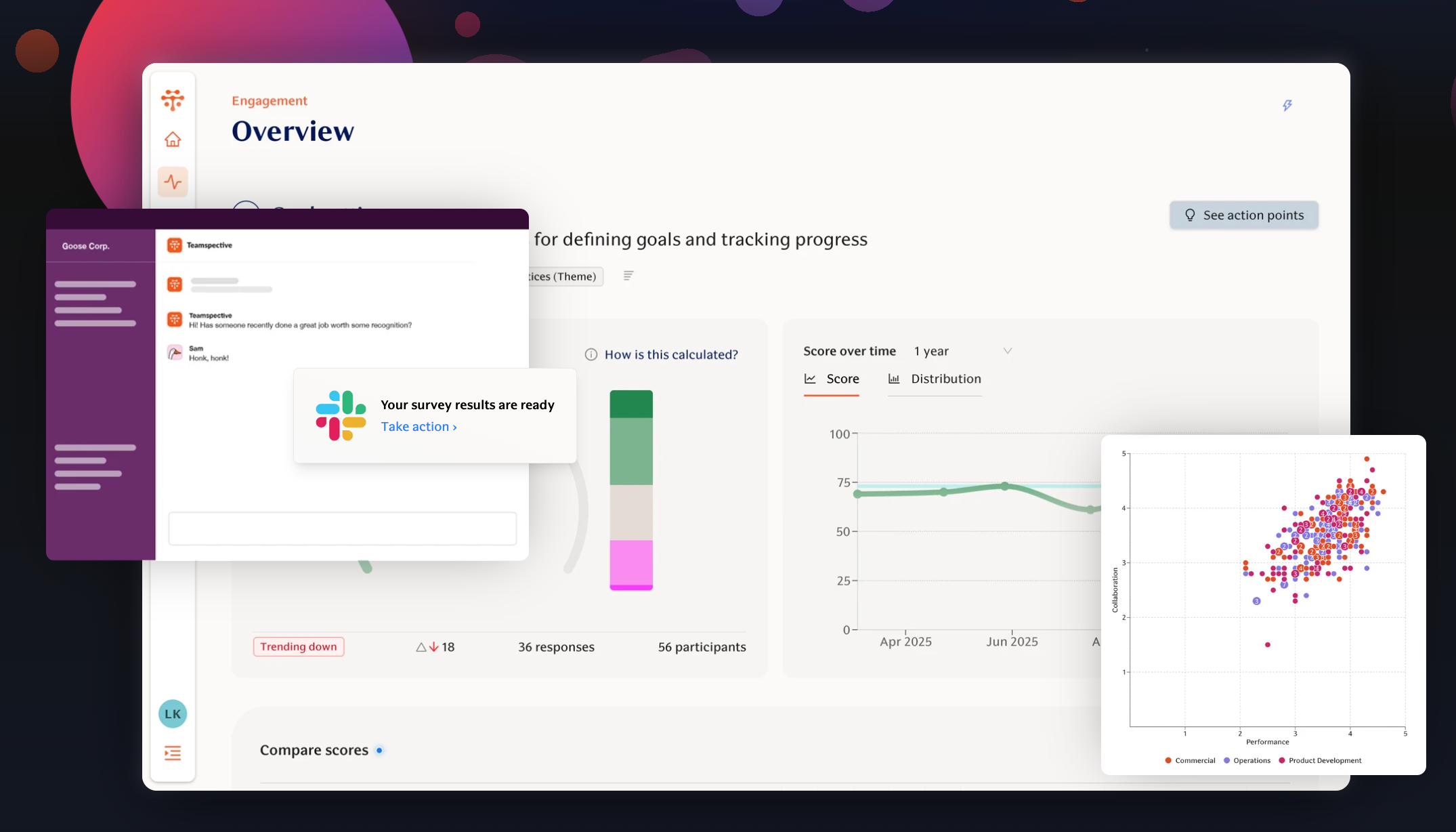
Image source: Teamspective engagement overview
Teamspective is a leadership enablement platform that combines employee engagement, performance, and collaboration.
It takes a more employee-driven approach to 360 feedback. Rather than making every assessment depend on HR or a manager to initiate the process, it lets employees ask colleagues for input themselves, using the communication tools they already use.
That distinction matters if you want feedback to happen beyond scheduled review cycles. Someone who has just finished a demanding project, taken on a new responsibility, or worked closely with another team can request input while the experience is still fresh.
How Teamspective’s 360-Degree Feedback Works
HR and team leads retain control over the structure, while employees can request feedback. Here's how the process works:
1. Create feedback templates. HR and team leads build templates with questions tailored to the organization's expectations and development priorities.
2. Request feedback. Once an admin enables employee-led requests, employees can choose reviewers, select an approved template, and set a deadline directly in Slack, Microsoft Teams, or the web app. Managers can also organize requests on someone else's behalf.
3. Collect responses. Contributors receive requests and can submit their responses in Slack or Teams, or through the web app. Automatic reminders and request tracking help keep the process moving.
4. Make feedback easier to act on. Teamspective’s AI summaries highlight strengths and development areas across written feedback, helping employees and managers identify recurring themes and focus their development conversations.
5. Turn feedback into a development conversation. A discussion host can bring insights from an employee's latest structured evaluation into a discussion note, alongside agendas, shared notes, and action items. Discussions can also connect to a Slack channel, where participants can follow notes and comments and agree on what to do next.
At Columbia Road, a consultancy without traditional line managers, employees used Teamspective to start their own 360 peer evaluations. They could ask for input when it was useful, such as after a challenging project, without waiting for someone else to start the review. The company then used that feedback to inform its twice-yearly salary discussions. Read the case study

Teamspective sends a five-question pulse survey in Slack
Limitation
Employees can request and submit feedback in Slack or Microsoft Teams, but authorized users manage results and moderation in the Teamspective web app.
Pricing
Teamspective's Standard plan starts at €5.50 per seat per month for organizations with up to 300 seats. Organizations with more than 300 seats can request Enterprise pricing.
If you're looking for a way to make feedback requests easier to initiate and connect the results to follow-up conversations, book a Teamspective demo to see how the workflow could fit your team.
Book a Demo
Want to see how this would work for your team? Book a Teamspective demo to explore collecting 360 feedback in Slack or Microsoft Teams and bringing the results into development discussions.
Schedule Demo2. Culture Amp
Best fit: Organizations that want to make multi-rater feedback part of a broader performance management and employee development process.

Image source: Culture Amp engagement survey report
Culture Amp is an employee experience platform that brings engagement, performance, and employee development together. Its approach to 360-degree feedback reflects that broader focus: rather than treating multi-rater feedback as a standalone assessment, it connects feedback to employee effectiveness and development.
This gives you flexibility to run dedicated feedback exercises or make multiple perspectives part of an established review process. Compared with Teamspective's employee-led requests through Slack and Microsoft Teams, Culture Amp places more emphasis on structured review programs and connecting feedback to its wider employee experience offering.
How Culture Amp's 360 Feedback Works
Culture Amp supports a couple of related approaches, depending on what you want to achieve:
- Individual Effectiveness 360: Employees collect feedback from managers, peers, and direct reports to better understand their strengths and development areas. They review the results with a nominated coach, usually their manager. This assessment is intended for development, not formal performance evaluation.
- 360 feedback in performance reviews: HR teams can combine peer feedback and upward feedback with self-reflections and manager reviews. They can run these components together or configure a cycle around the stages they need.
Employees can nominate reviewers, while managers can review nominations, add reviewers, or manage requests depending on the cycle setup. HR teams can track requests and completion through an administrative dashboard. Once feedback is collected, results can inform review conversations and development plans.
The distinction between the two approaches matters: Individual Effectiveness 360 gives employees a dedicated view of how colleagues perceive their work, while performance review feedback brings multiple perspectives into a wider assessment.
Limitations to Consider
Culture Amp's Individual Effectiveness 360 does not enforce a minimum reporting threshold. If only one person in a reviewer category submits feedback, the recipient may be able to identify them.
Pricing
Culture Amp uses custom pricing based on company size and the products selected. You'll need to contact its sales team for a quote.
3. Leapsome
Best fit: Organizations that want configurable 360 assessments connected to performance reviews, competencies, and employee development.

Image source: Leapsome goals and progress view
Leapsome is a people enablement platform that connects performance management, employee engagement, goals, and learning. Its 360-degree feedback capability sits within this broader system, allowing organizations to gather perspectives from different working relationships and connect the results to performance reviews and employee development.
This makes Leapsome useful if you want feedback to do more than provide an assessment snapshot. While Culture Amp offers dedicated developmental 360 assessments alongside its broader review process, Leapsome emphasizes connecting feedback with the systems employees and managers use to track progress and build skills.
How Leapsome's 360 Feedback Works
Leapsome lets you build review cycles around different assessment types. A 360 assessment can combine self-evaluations, manager reviews, peer feedback, and input from direct reports. You can also include external collaborators, which is useful when employees work closely with clients or project partners.
You decide how peers are selected. Employees can nominate colleagues for approval, managers can choose reviewers, or administrators can assign them. You can also set minimum and maximum numbers of peer reviewers and customize questionnaires for different roles or review purposes.
Once a cycle begins, Leapsome automates assessment requests, notifications, and reminders. Feedback can then feed into competency ratings, calibration, and development conversations. Its review tools also connect with goals and learning, helping managers consider feedback alongside progress toward objectives and skill development.
Limitations to Consider
For aggregated anonymous peer results, at least two peer responses are needed before scores appear. Manager assessments cannot be made anonymous, so make sure your team understands who can see each type of feedback.
Pricing
Leapsome lists its Performance Reviews module at €7 per employee per month, with the HRIS Foundation also required.
4. Lattice
Best fit: Organizations that want to combine multi-rater feedback with performance reviews, talent assessments, and succession planning.

Image source: Lattice Goals & OKRs view
Lattice is a people management platform that brings performance management, employee engagement, and talent development into one system. Its 360-degree feedback capabilities form part of this connected approach, helping organizations gather perspectives from managers, peers, direct reports, and employees themselves as part of broader performance and talent processes.
The distinction becomes clearer when you look at what happens after feedback is collected. Compared with Leapsome's emphasis on linking feedback to goals and learning, Lattice offers a stronger connection to talent assessment and workforce planning.
How 360 Feedback Works in Lattice
Lattice supports several review perspectives, including self-reviews, manager reviews, peer reviews, and upward feedback. You can combine them in one review cycle or choose the components that suit your process.
For peer reviews, employees can suggest colleagues they've worked with, while managers and HR can oversee reviewer assignments. Administrators can track assignments and completion, then use the collected responses alongside ratings, goals, and competencies during review and calibration.
This broader setup is useful when you want to consider how someone works with colleagues alongside their individual performance. The feedback can also contribute to talent reviews and succession planning, giving HR teams more context when assessing performance and future potential.
Limitations to Consider
Lattice requires a $4,000 minimum annual agreement, even though its products are priced separately. That can make it a significant commitment for smaller teams looking for a standalone feedback tool.
Pricing
Lattice Performance starts at $10 per seat per month, billed annually. The platform has a $4,000 minimum annual agreement.
5. Qualtrics
Best fit: Organizations that need structured 360 feedback programs with configurable assessments and individual reports to support employee development.

Qualtrics is an experience management platform with tools for collecting and analyzing feedback across customer and employee experiences.
Rather than positioning 360 feedback primarily as one part of an ongoing performance management system, Qualtrics focuses on configurable assessments and the insights they produce. Employees can nominate evaluators, while administrators manage the assessment process and reporting. This makes it worth considering if you need a dedicated, customizable development assessment. If you want feedback closely connected to goals, performance reviews, and talent planning, platforms such as Lattice may offer a more integrated workflow.
How its 360 Feedback Works
Qualtrics lets you configure assessments around different reviewer relationships, such as managers, peers, and direct reports. Employees can nominate colleagues to provide feedback, while managers can approve nominations or assign evaluators themselves, depending on the project settings.
For a more employee-driven approach, Qualtrics also offers Employee-Led 360 projects. Employees can opt into an assessment when it suits their development goals, choose their evaluators, and complete a self-reflection. Once feedback is collected, each participant receives a personalized report they can use to identify development areas.
Administrators can manage nominations, monitor completion, control when reports become available, and download reports for participants. This gives HR teams oversight of the program without requiring them to initiate every individual assessment.
Limitations to Consider
Qualtrics offers considerable control over standard 360 projects, but its Employee-Led 360 format includes some fixed settings. Administrators can adjust the assessment completion window, but cannot remove it; they also cannot turn off the automatic email notifying employees when their reports are available.
Pricing
Qualtrics’s product terms state that 360 Development is priced based on the number of Employees, while allowing unlimited 360 feedback surveys of target employees during the annual subscription period
6. BambooHR
Best fit: Organizations that want to manage 360 feedback alongside employee records, performance reviews, and other HR workflows.

Image source: BambooHR data reporting dashboard
BambooHR is an HR software platform that brings employee records, hiring, onboarding, payroll, and performance management into one system. Its 360-degree feedback capability is part of its broader performance management offering, allowing organizations to gather input from multiple working relationships without managing the assessment separately from their HR processes.
Employees can receive feedback from managers, peers, and direct reports, alongside their own self-assessments. This makes it a practical option if you're already using BambooHR to manage employee information and want to add multi-rater feedback to the same system. If you only need a dedicated 360 assessment without adopting a wider HR platform, Qualtrics or Spidergap may be more suitable.
How BambooHR's 360 Feedback Works
BambooHR lets you build review cycles that combine four perspectives:
- Self-assessments
- Manager assessments
- Peer feedback
- Upward feedback from direct reports
You can customize peer and upward feedback questions, use pre-built assessment templates, or create review cycles around your own process. Automated email reminders and completion notifications help keep participants on track, while performance reports let managers and HR teams review results across employees, departments, and locations.
The platform also connects reviews to goals and one-on-one meetings. That makes it easier to use feedback in regular performance conversations rather than treating each 360 assessment as a separate exercise.
Limitations to Consider
The main consideration is that 360 feedback isn't available as a standalone product. It's included in BambooHR's Pro plan and above, so you'll also be paying for the wider HR and performance management platform.
Pricing
BambooHR Pro starts at $17.50 per employee per month for organizations with more than 25 employees. Companies with 25 employees or fewer pay a flat $425 per month.
7. Deel
Best fit: Organizations that want structured multi-rater reviews alongside continuous feedback, goals, learning, and career development.

Deel is best known for its global HR and payroll platform, but Deel Engage extends its offering into talent management. It brings performance reviews, goals, learning, surveys, and career development into one system. Its 360 feedback capabilities sit within this broader offering, giving organizations a way to connect feedback with employee performance and development.
This makes Deel different from BambooHR, where 360 reviews are part of a broader HRIS, and Lattice, which connects review results to talent assessments and succession planning. Deel emphasizes combining formal review cycles with feedback employees can exchange throughout the year.
How its 360 Feedback Works
HR teams can build review cycles using self-reviews, manager assessments, peer feedback, and upward feedback from direct reports. They can customize questions and rating scales, link assessments to goals or competencies, and configure reviewer nominations and approval.
Employees can nominate peers, while managers and administrators can approve those choices or assign reviewers themselves. Once a cycle is underway, administrators can track completion and manage submissions.
After the review, managers can use competency radar charts, skills heat maps, and 9-box grids to interpret results. Calibration and weighted scoring also help bring different feedback sources together when assessing performance.
Deel also offers Instant Feedback, which lets employees request or share input outside scheduled review cycles. Those contributions can appear in the context panel when managers prepare formal reviews, giving them more recent observations to consider alongside assessment results.
Limitations to Consider
Deel Engage is sold as an all-in-one talent management system rather than a standalone 360 feedback product. It also requires Deel's HRIS foundation, which may be unnecessary if you already have an HR system and only want to improve feedback collection.
Pricing
Deel lists Engage at $20 per worker per month for its complete talent-management system. Because Deel HRIS is a required foundation for Engage, organizations should also account for Deel HRIS pricing, listed at $5 per employee per month.
8. ThriveSparrow
Best fit: Organizations that want structured 360 assessments, detailed performance reports, and AI-assisted employee development.

Image source: ThriveSparrow homepage
ThriveSparrow positions itself as an AI-native employee experience platform, with dedicated tools for performance management, employee engagement, and continuous feedback. Its 360 feedback capabilities sit within the Performance module, connecting multi-rater assessments to competency analysis, performance reporting, and personalized development plans.
Unlike Deel, which emphasizes bringing formal reviews and ongoing feedback into a broader talent management system, ThriveSparrow puts more weight on helping managers interpret assessment results and turn them into specific development actions.
How 360 Feedback Works
HR teams can create assessments from templates or build questionnaires from scratch, customizing questions and rating scales to match their review criteria.
Employees complete self-assessments when enabled and nominate colleagues to provide feedback. Managers or HR administrators approve those nominations before reviewers receive email invitations to submit their assessments. Managers also review the completed evaluations before the final report is shared with the employee.
The resulting reports go beyond individual scores. You can compare feedback across rater groups, examine competency gaps using radar charts, and use heatmaps and team analytics to identify patterns across departments or roles.
ThriveSparrow also offers AI-generated Personal Development Plans (PDPs) and action plans based on performance insights. This is useful if you want feedback to lead to specific improvement goals rather than remain a collection of review scores.
Limitations to Consider
The 360 assessment workflow involves manager or HR approval of reviewer nominations and final reports. That gives your organization oversight, but it may add coordination if you prefer a more employee-led process with fewer approval stages.
Pricing
ThriveSparrow's Performance module starts at $5 per employee per month, billed annually. The Performance + Goals bundle starts at $7 per employee per month.
9. Betterworks
Best fit: Organizations that want to bring peer, manager, and upward feedback into an ongoing performance management process.

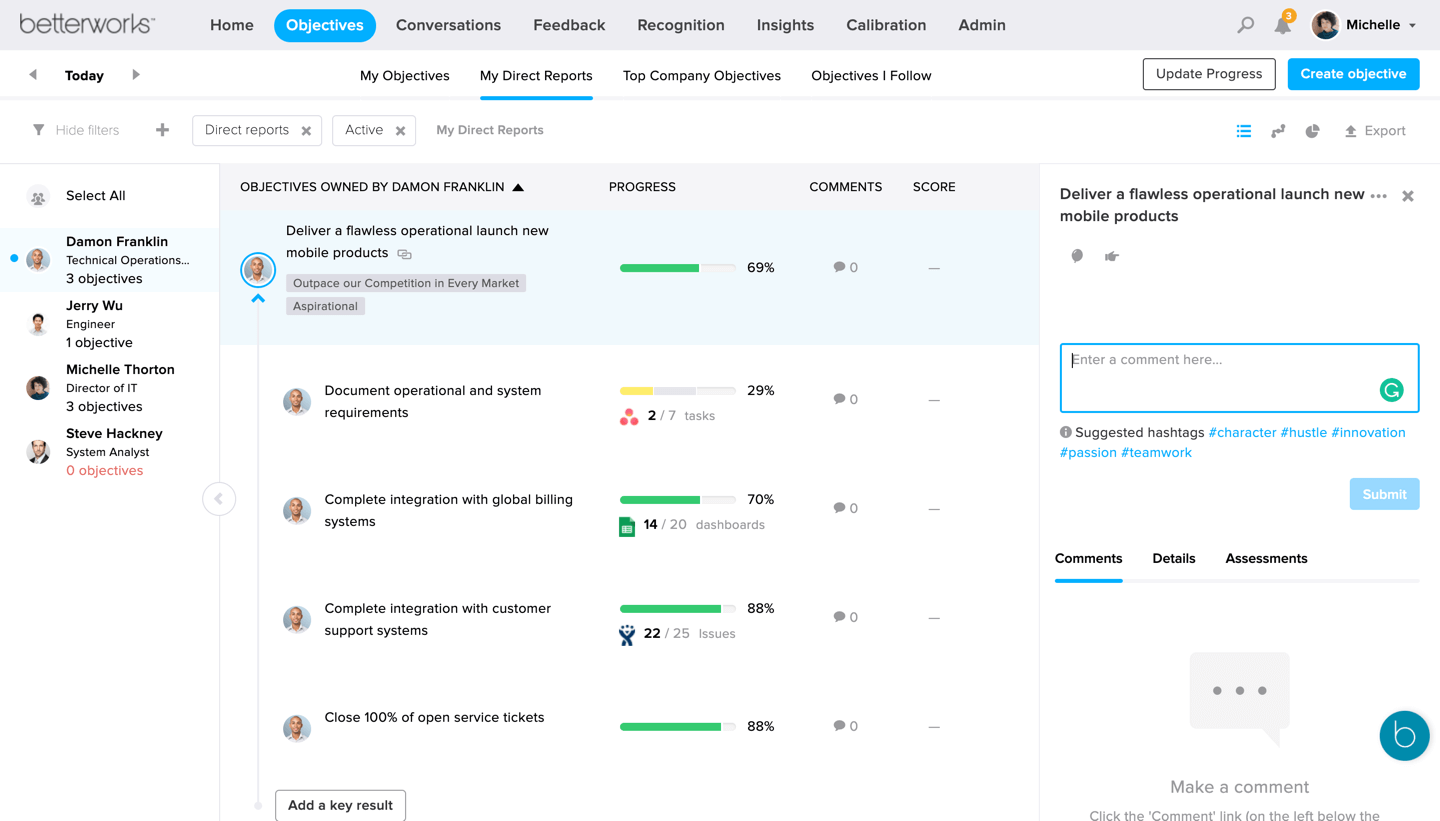
Image source: Betterworks Goals
Betterworks is a continuous performance management platform that connects employee feedback, goals, performance conversations, and talent insights. Its 360 feedback capabilities fit into this broader approach: rather than treating multi-rater assessments as isolated events, Betterworks helps organizations capture feedback throughout the year and bring it into formal reviews.
This makes it a different proposition from ThriveSparrow, which emphasizes analyzing 360 results and creating individual development plans. Betterworks focuses more on building a continuous performance record that managers can draw on when reviewing employees.
How 360 Feedback Works
Employees and managers can request feedback after projects, milestones, or meetings using customizable templates. Betterworks supports peer, manager, upward, and 360-degree feedback, with configurable templates, visibility settings, and feedback schedules.
Employees can also receive feedback through Slack, Microsoft Teams, Outlook, or Gmail, making it easier to collect input without waiting for the next review cycle. For customer-facing or project-based roles, External Feedback lets clients, partners, and suppliers contribute structured input without creating Betterworks accounts.
The results connect to the wider performance process. Feedback, recognition, and coaching notes automatically carry into subsequent reviews, while AI analyzes trends to highlight emerging strengths, sentiment changes, and potential bias risks. Managers can use this information alongside goals and performance conversations to get a broader view of an employee's contributions.
Limitations to Consider
Betterworks is more suitable if you want continuous feedback and performance management in one platform. If you need a dedicated 360 assessment with specialized individual reports, check the available reporting formats and assessment controls before committing.
Pricing
Betterworks' Performance plan starts at $8 per user per month and includes feedback, goals, performance conversations, and 1:1 meetings. Implementation carries an additional one-time fee.
10. SurveyMonkey
Best fit: Organizations that want a flexible way to collect multi-rater feedback without adopting a full performance management platform.

Image source: SurveyMonkey engagement dashboard
SurveyMonkey is an online survey and forms platform used for customer research, employee feedback, and other data collection needs. Its 360-degree feedback capabilities come through customizable surveys and ready-made templates rather than a dedicated performance management module.
This makes it a simpler alternative to Betterworks if you already have a system for managing performance reviews and don't need feedback connected to goals, coaching, or ongoing performance conversations.
How 360 Feedback Works
You can start with SurveyMonkey's 360 Review Template, which includes questions for evaluating supervisors, coworkers, and direct reports. Alternatively, build your own questionnaire with rating scales, competency-based questions, and open-text responses tailored to the roles you're assessing.
Once your survey is ready, distribute it to managers, peers, and direct reports using email invitations or a shareable link. SurveyMonkey collects responses and presents the results through charts and summary reports. Depending on your plan, you can also use AI analysis and thematic analysis to identify patterns in written responses.
The flexibility is useful if you want control over your questions and survey design. However, you'll need to organize reviewer assignments, coordinate the assessment process, and decide how results feed into employee development yourself.
Limitations to Consider
SurveyMonkey offers a 360 review template and flexible survey tools, but its public documentation does not describe a dedicated, end-to-end 360 review workflow with built-in reviewer nomination, approval, and performance-review management. If you need those controls, or want feedback automatically connected to development plans, a purpose-built platform such as Spidergap may be a better fit.
Pricing
SurveyMonkey offers a free Basic plan with limited questions and responses. Its Team Advantage plan starts at $30 per user per month, billed annually, with a minimum of three users.
11. Spidergap
Best fit: Organizations that want a purpose-built 360 feedback tool with structured reviewer management, customizable assessments, and development-focused reports.

Image source: Spidergap feedback reports
Unlike SurveyMonkey, which gives you general-purpose survey tools to build your own feedback process, Spidergap is designed specifically for 360-degree assessments. It provides a guided workflow for selecting reviewers, collecting responses, and delivering individual reports, so you don't have to coordinate every stage manually.
How 360 Feedback Works
You can start with Spidergap's best-practice questionnaire templates or customize questions, rating scales, and assessment settings to match your organization's competencies and development priorities.
Employees can nominate their own feedback providers, or you can assign reviewers centrally. If employees choose their reviewers, you can add an approval stage so a manager or coach checks the list before invitations go out. Contributors receive email invitations with unique links to complete their questionnaires, without needing to create an account.
Once responses are collected, administrators decide when to share the results. Employees receive downloadable PDF reports showing feedback from different reviewer groups, helping them identify strengths and development priorities. HR teams can also generate group reports, compare results, and export data for further analysis.
Limitations to Consider
Spidergap focuses on the 360 assessment process rather than broader performance management. If you also need goal tracking, ongoing manager conversations, or integrated performance reviews, you'll need another platform for those workflows.
Pricing
Spidergap's Starter plan costs $1,099 per year and includes 10 feedback recipients. Additional recipients cost $89 per person per year.
12. SurveyConnect
Best fit: HR teams, learning and development professionals, and consultants who want tailored 360 assessments with support for survey setup, administration, and reporting.

Image source: SurveyConnect Feedback survey
SurveyConnect specializes in 360-degree assessments and survey services. Its ActiveView 360 platform combines configurable assessment tools with hands-on support from the SurveyConnect team. This is a useful distinction if you want a feedback process tailored to your organization's competencies and reporting needs but don't want to build and configure everything yourself.
Compared with Spidergap, which provides a more self-service assessment workflow, SurveyConnect puts greater emphasis on assisted setup and customized reporting.
How 360 Feedback Works
You can use questions from SurveyConnect's sample library or supply your own, then customize the assessment framework, branding, and participant communications. Its team can also help load employee and reviewer lists, configure the project, and prepare the survey for launch.
Once invitations go out, administrators can monitor responses through a project dashboard, track completion in real time, and use automated email reminders to follow up with reviewers.
The reporting is another important part of the offering. You can choose from individual and group reports, competency scores, gap analyses, demographic breakdowns, and summaries of written comments. Reports can be customized and exported as PDF or Word documents, giving employees and coaches material to use in development discussions.
SurveyConnect also supports multiple projects, which can be useful if you're an external consultant or manage feedback programs across different teams or clients.
Limitations to Consider
SurveyConnect focuses on assessment administration and reporting rather than providing a broader performance management platform. If you also need integrated goal tracking, ongoing performance conversations, or learning management, you'll need separate tools for those workflows.
Pricing
Costs depend on your assessment requirements and configuration, so you'll need to request a quote.
Key Features to Look for in 360-Degree Feedback Software
Not every 360-degree feedback tool handles the process in the same way. Some focus on collecting responses and generating reports, while others connect feedback to performance reviews, employee development, and talent decisions.
As you compare platforms, pay attention to these capabilities and how they fit your organization's needs.
1. Customizable Surveys and Feedback Forms
Every organization has unique needs and priorities when it comes to evaluating performance and behavior. Top-tier 360-degree feedback platforms offer flexibility to customize questionnaires, rating scales, and feedback prompts to align with your company’s values, competency frameworks, and development goals.
Look for software that allows you to:
- Create different templates for various roles or departments
- Balance quantitative ratings with qualitative comments
- Increase participation rates by integrating fully with Slack or Teams
- Add company-specific competencies or behaviors
- Customize the language and terminology used
This customization ensures that the feedback gathered is relevant to your organizational context and provides actionable insights that align with your company’s development philosophy.
2. Anonymous Feedback Options
Anonymity can encourage reviewers to share honest observations, particularly when giving feedback to managers or senior colleagues. However, anonymous feedback needs clear rules about who can see individual responses and when results become available.
Check whether the platform supports anonymous responses, minimum reporting thresholds, and separate visibility settings for administrators, managers, and recipients. Some tools hide reviewer names from employees while still allowing authorized HR users to identify contributors.
Explain these rules before an assessment begins. Otherwise, employees may make assumptions about confidentiality that the software doesn't actually guarantee.
3. Multi-Rater Feedback Collection
The core functionality of any 360-degree feedback software is its ability to efficiently collect input from multiple stakeholders. The best platforms balance thoroughness with intuitive user experience, making the feedback collection process comprehensive without becoming burdensome for participants.
4. Integration With HR and Performance Management Systems
Feedback becomes more useful when it connects to the other systems your organization already uses.
Look for integrations with your HRIS to synchronize employee records and organizational structures, and with performance management or learning platforms to connect assessment results to reviews and development plans. Communication integrations with tools such as Slack and Microsoft Teams can also make it easier for employees to request and submit feedback.
The image below shows Teamspective's Slack integration displaying a feedback results snapshot, showing employee responses, benchmark comparisons, and changes in scores across several workplace questions.

Image source: Teamspective's Slack integration
Don't assume every integration supports the same functionality. Some only synchronize employee data or send notifications, while others support actual feedback requests and responses. Check what each connection allows you to do.
5. Advanced Analytics and Reporting
Raw feedback data has limited value without insightful analysis and presentation. Many 360-degree feedback software tools transform collected responses into clear, actionable insights. By combining visual dashboards and theme identification in comments, they help recipients make sense of feedback and identify the most important areas for focus and development.
6. Succession Planning and Talent Analytics Integration
If you use 360 feedback to support leadership development, consider how assessment results can inform your talent planning process.
Some platforms connect feedback and competency assessments to talent reviews, succession planning, and development frameworks. This can help HR teams identify employees who may be ready for greater responsibility and the skills they need to develop before taking on future roles.
However, 360 feedback should be one input among several. Combine it with performance history, demonstrated capabilities, career interests, and manager assessments before making decisions about promotions or succession.
Benefits of 360-Degree Feedback Software
A well-run 360-degree feedback process gives employees a broader view of how they work with others. It also gives managers and HR teams more context for development conversations and performance decisions.
Here are some of the main benefits you can expect when the process is structured properly.
1. Better Self-Awareness and Employee Development
One of the most powerful benefits of 360-degree feedback is its ability to enhance self-awareness. This expanded self-awareness directly impacts development and is the foundation of professional growth. Research suggests that companies implementing effective feedback loops see a 21% increase in employees’ productivity.

When employees understand both their strengths and growth areas from multiple perspectives, they can create more targeted development plans that address real needs rather than perceived ones.
2. A More Comprehensive Performance Evaluation
Traditional performance reviews often suffer from being one-dimensional, relying heavily on a single manager’s perception. 360-degree feedback software counters this limitation by providing a multi-faceted view of performance that captures different aspects of an employee’s contributions.
This comprehensive approach leads to fairer, more balanced evaluations that consider both technical skills and interpersonal competencies, areas that might be overlooked in traditional reviews but often determine long-term success.
3. More Open Feedback and Trust
According to HBR, employees that work for companies that prioritize trust and psychological safety report 74% less stress, 106% more energy at work, 50% higher productivity. When implemented thoughtfully, 360-degree feedback software strengthens team dynamics by normalizing constructive feedback in all directions. It breaks down hierarchical barriers to communication and creates psychological safety around sharing observations and suggestions.
4. Time Savings and Administrative Efficiency
Without dedicated software, 360-degree feedback can become an administrative nightmare. Distributing forms, collecting responses, compiling data, and creating reports manually is the very definition of time-consuming. Modern feedback platforms automate these processes, reducing administrative overhead significantly.
These efficiency gains make frequent feedback cycles practical and sustainable. Rather than limiting comprehensive feedback to annual reviews, organizations can implement quarterly or even monthly check-ins, creating a continuous improvement cycle that better supports employee development and organizational agility.
5. Better-Informed Talent and Development Decisions
Perhaps one of the most underappreciated benefits of 360-degree feedback software is its ability to generate organization-wide insights. When feedback data is captured and anonymized, it reveals broader patterns about company culture, leadership effectiveness, and team dynamics. These data-driven insights enable more targeted organizational development initiatives and more informed talent decisions.
Just remember that peer and manager feedback should inform these decisions alongside demonstrated performance, skills, experience, and career interests. A single 360 assessment shouldn't determine someone's readiness for a promotion.
How to Successfully Implement 360-Degree Feedback Software
Choosing the right platform is only part of the work. Employees need to understand why you're collecting feedback, reviewers need to know how to give it constructively, and managers need a plan for turning the results into meaningful development conversations.
These steps can help you introduce 360-degree feedback without making it feel like another administrative exercise.
1. Set Clear Goals and Expectations
Before launching any 360-degree feedback initiative, define what success looks like. Are you primarily focused on leadership development? Improving team collaboration? Enhancing performance management? Your objectives will shape everything from the feedback questions you ask to how you communicate about the process.
Be explicit about:
- How feedback will be used (development only or influencing performance reviews)
- Who will have access to the results
- How often feedback cycles will occur
- What actions are expected following feedback sessions
- How the organization will support employees in addressing development areas
This clarity establishes trust in the process and increases the likelihood that feedback will lead to meaningful change.
2. Ensuring Employee Buy-In and Trust
Even the most sophisticated feedback platform will fail without employee engagement and trust in the process. Tchnology is just an enabler; the real success factor is creating psychological safety around feedback.
Remember that trust builds gradually. If you’re in the beginning of your feedback culture journey, give your employees time to adjust. Keep up transparent communication and incur support from the leadership team, and trust will follow.
3. Train Employees and Managers to Use the Software
Both giving and receiving feedback are learned skills that improve with guidance and practice. Invest in training that prepares all participants to engage productively with the process:
For feedback providers:
- How to provide specific, behavioral examples
- Balancing constructive feedback with recognition
- Avoiding common biases in evaluation
- Focusing on observable behaviors rather than assumed intentions
For feedback recipients:
- Processing feedback without defensiveness
- Identifying patterns and priorities in diverse input
- Creating development plans based on feedback
- Following up appropriately with feedback providers
For managers and HR:
- Facilitating productive feedback discussions
- Supporting employees in creating development plans
- Recognizing and addressing potential biases in feedback
- Using aggregated insights for team development
4. Analyze Feedback and Agree on Next Steps
The true value of 360-degree feedback emerges when it leads to concrete action. Create structured processes for translating feedback into development plans and monitor progress over time.
Effective action planning includes:
- Identifying 2-3 priority development areas based on feedback patterns
- Creating specific, measurable development goals
- Connecting employees with relevant learning resources and opportunities
- Scheduling regular check-ins to discuss progress
- Recognizing and celebrating improvements
Remember that some development areas may require structural or team-level interventions beyond individual effort. Be prepared to address systemic issues that emerge from feedback patterns.
How AI Is Transforming 360-Degree Feedback Software
AI is making 360-degree feedback easier to interpret and act on. Instead of leaving employees and managers to work through pages of comments, some platforms can organize written responses into recurring themes, highlight development areas, and help prepare follow-up conversations.
Turning Feedback Into Clearer Insights
For example, Teamspective generates summaries from published written feedback using two frameworks:
- Start, Stop, Continue: Organizes feedback around behaviors employees should start, stop, or continue.
- Strengths and Development Areas: Highlights positive contributions and areas where employees can improve.
Its AI agent can also help managers prepare agendas for growth discussions using available feedback and discussion notes. This gives managers a starting point for exploring the results with employees rather than treating the summary as a final assessment.
Connecting Insights to Development Plans
Other platforms take the next step by turning assessment results into development plans. ThriveSparrow, for instance, offers AI-generated Personal Development Plans based on performance feedback, helping employees and managers translate identified gaps into practical actions.
Why Human Review Still Matters
These features can reduce the effort involved in interpreting feedback and planning what comes next. But AI-generated summaries and recommendations still need human review. Managers should check whether suggestions reflect the actual responses, consider the context behind conflicting opinions, and discuss development priorities with employees before agreeing on next steps.
Frequently Asked Questions
What's the difference between 360-degree feedback and a performance review?
A performance review typically focuses on an employee's goals, results, and manager assessment. 360-degree feedback adds perspectives from people who work with the employee, such as peers, direct reports, and project collaborators. Organizations can use it independently for development or include it as one input in a broader performance review.
Is 360-degree feedback anonymous?
It depends on the software and how your organization configures it. Some platforms hide reviewers' names from the employee receiving feedback while allowing HR or authorized managers to see individual submissions. Others use minimum response thresholds before displaying anonymous group results. Check these settings before launching an assessment so everyone understands what is confidential.
Can 360-degree feedback software help with succession planning?
Yes. Feedback can reveal leadership strengths, competency gaps, and areas where employees may need development before taking on greater responsibility. Some platforms connect assessment results to talent reviews and succession planning. However, 360 feedback should be one input alongside performance history, demonstrated skills, experience, and career interests, not the sole basis for promotion decisions.
Can I run a 360-degree feedback assessment with a free tool or template?
Yes. You can create questionnaires using free survey tools or templates, distribute them manually, and compile responses yourself. This may work for a small team or occasional assessment. However, reviewer management, reminders, confidentiality, reporting, and follow-up become harder to coordinate as participation grows. Dedicated software helps manage more of that process.
For a simple, one-off assessment, SurveyMonkey’s free Basic plan can be a practical starting point. It includes unlimited surveys, but each survey is limited to 10 questions and a limited number of viewable responses.
How much does 360-degree feedback software cost?
Pricing varies by platform and how you use it. Some vendors charge per employee or user, while dedicated assessment tools may charge based on the number of people being assessed. Others include 360 feedback in a larger performance management package or provide custom quotes. Check which modules, implementation services, and features are included before comparing prices.
Choose a 360-Degree Feedback Tool That Fits Your Team
The right 360-degree feedback software should do more than collect opinions. It should make it easier for people to request feedback, understand different perspectives, and turn the results into useful development conversations.
If you want employees to initiate feedback requests and respond through the communication tools they already use, Teamspective is worth considering. Employees can request and give structured feedback through Slack or Microsoft Teams, while HR and managers retain control over templates, moderation, and publication. Employees then review their published results in the web app, with optional AI summaries to help identify strengths and development areas.
This approach can help make feedback part of everyday development rather than something that happens only during annual reviews.
Book a Demo
Want to see how this would work for your team? Book a Teamspective demo to explore collecting 360 feedback in Slack or Microsoft Teams and bringing the results into development discussions.
Schedule Demo